
Enabling full keyboard navigation on all focusable interactive elements in macOS Safari and Firefox.
Keyboard navigation through all focusable interactive elements isn’t enabled by default on macOS for Safari and Firefox browsers, but there is a way to solve that issue.
The macOS System preference for Use keyboard navigation to move focus between controls
is unchecked by default. That means Mac only allows tabbing between text fields and pop-up menus by default. See also Mac accessibility shortcuts.
The solution for enabling navigation through all focusable interactive elements
To enable the TAB key to move through all interactive controls in web pages, including links, you need to perform the following steps:
- System Preferences.
- Keyboard.
- Shortcuts.
and check the box for Use keyboard navigation to move focus between controls
.
Safari browser settings
In Safari there is an option Press Tab to highlight each option on a web page
by default unchecked that overrides the System preference at Safari:
- Safari Preferences.
- Advanced.
- Press Tab to highlight each option on a web page.
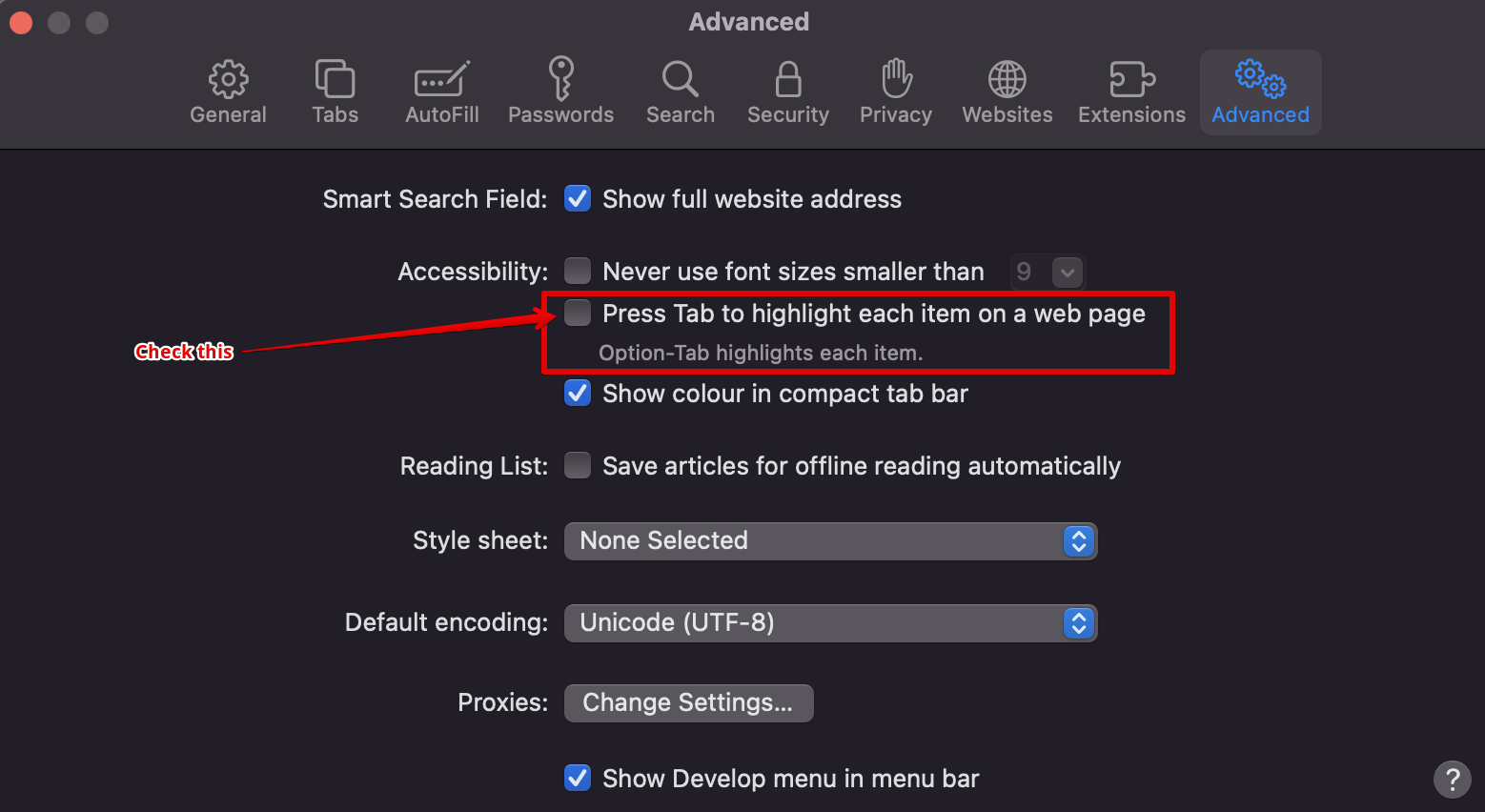
When not checked, Safari can highlight additional items on web pages by holding Option when hitting the Tab key. When the preference in Safari is checked, the Option key is then reversed and used to limit highlighting to just text boxes and pop-up menus.
Comments